Network Setup
Network topology and bridge configuration
VaultDEC requires careful network topology to maintain the separation between its data plane and management plane. This page covers the physical and logical network configuration.
Network Topology
The Fundamental Rule
The management port must be on a separate physical network from the data plane.
This is not optional. If the management port shares a network with the data plane, an attacker who compromises the protected server could potentially reach the management interface and disable VaultDEC.
Recommended Topology
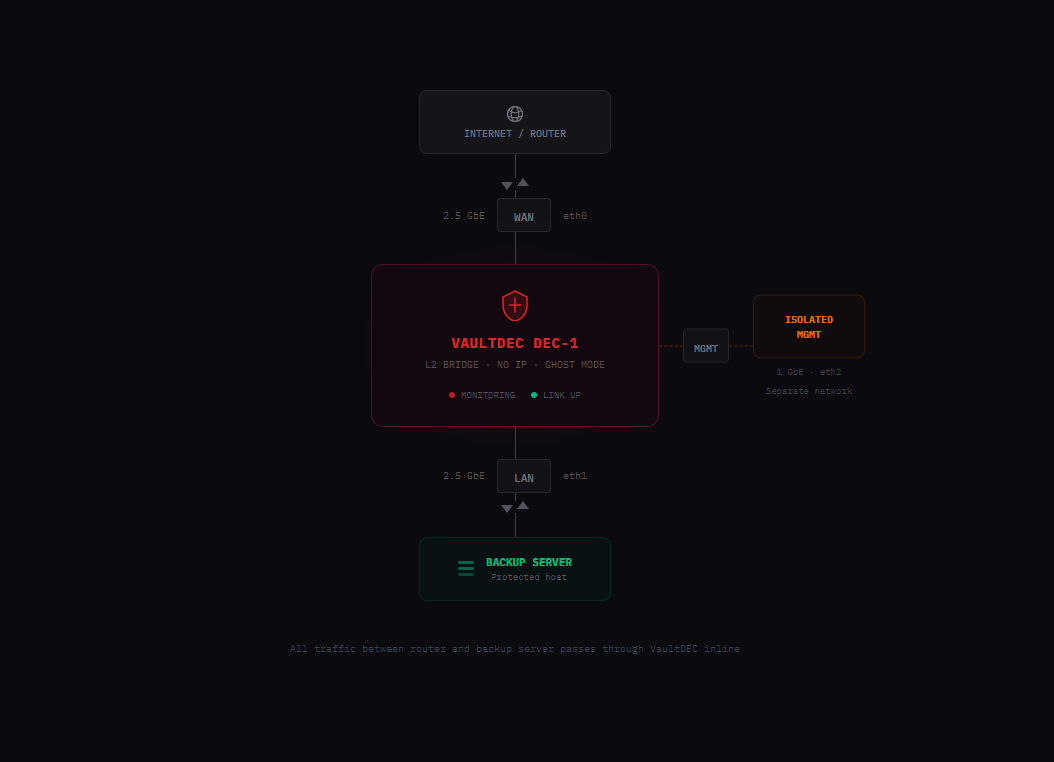
What "Separate Network" Means
The management switch should have no uplink to your production network or router. It's a standalone switch (or VLAN) that only contains:
- VaultDEC's MGMT port
- Your administration devices (laptop, workstation)
- Optionally: other management interfaces from other infrastructure
A remote attacker who compromises your router, your backup server, or any device on your production network cannot reach the management network because there is no physical path.
Port Configuration
Data Plane Ports (WAN + LAN)
These ports require zero configuration. VaultDEC handles everything internally:
- No IP addresses assigned
- No DHCP client running
- Bridge created automatically at boot
- Ghost mode (no ARP, no IPv6, no STP) enabled automatically
Your protected server and router connect to these ports exactly as if they were connected to a dumb switch. No configuration changes needed on either end.
Management Port (MGMT)
The management port needs an IP address. Two options:
DHCP (default): The MGMT port requests an address from whatever DHCP server is on the management network. If your management switch has a router or DHCP server, this works automatically.
Static IP: For environments without DHCP on the management network, configure a static address during initial setup via the serial console or pre-configured image.
Cloud Heartbeat (Optional)
VaultDEC works fully standalone without any cloud connectivity. However, if you want remote monitoring, the management port can send outbound heartbeats to VaultDEC's cloud service.
Requirements
- Management network must have an outbound internet path (direct or via proxy)
- Only HTTPS outbound to
api.vaultdec.comis required - No inbound ports need to be opened
- No reverse connections are established
Without Cloud
If the management network has no internet access, VaultDEC operates entirely standalone. You monitor it by connecting to the management network and using the SSH-triggered dashboard. The device doesn't need or expect cloud connectivity to function.
Firewall Recommendations
On Your Router
No changes needed. VaultDEC is invisible on the production network.
On the Management Network
If your management network has a firewall:
Allow outbound:
- TCP 443 to
api.vaultdec.com(heartbeat, if cloud monitoring enabled)
Allow inbound:
- TCP 22 from your administration devices to VaultDEC MGMT IP (SSH forced-command)
- TCP 8080 from your administration devices to VaultDEC MGMT IP (ephemeral dashboard, only when active)
Block everything else.
Troubleshooting
Protected server lost internet after connecting VaultDEC
- Verify cables are in the correct ports (WAN to router, LAN to server)
- Check that both data plane port LEDs show link (solid green)
- Power cycle VaultDEC — the bridge initializes on boot
Can't reach management interface
- Verify you're on the management network (not the production network)
- Confirm the MGMT port LED shows link
- Try
ping <mgmt-ip>from your laptop - If using DHCP, check your DHCP server's lease table for the VaultDEC device
Dashboard not loading after SSH command
- Verify the SSH command returned "Dashboard enabled for X minutes"
- Confirm you're accessing the correct IP and port (
http://<mgmt-ip>:8080) - Check that the TTL hasn't expired (dashboard auto-closes after the specified time)